 qianran
 100行代码实现简单的html登录页面
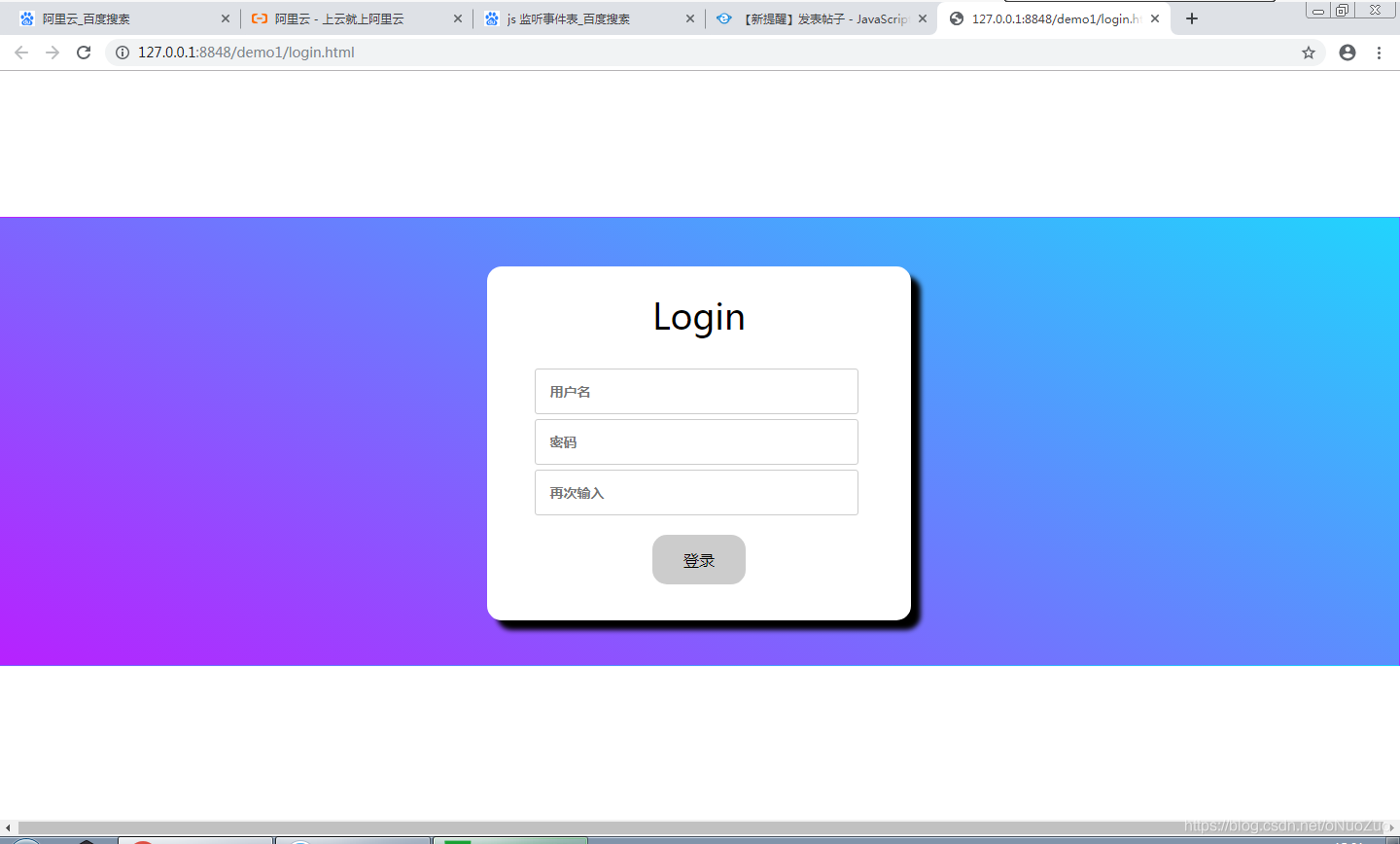
100行代码实现简单的html登录页面
2020年实训课简单练习做的
|
1 2 3 4 5 6 7 8 9 10 11 12 13 14 15 16 17 18 19 20 21 22 23 24 25 26 27 28 29 30 31 32 33 34 35 36 37 38 39 40 41 42 43 44 45 46 47 48 49 50 51 52 53 54 55 56 57 58 59 60 61 62 63 64 65 66 67 68 69 70 71 72 73 74 75 76 77 78 79 80 81 82 83 84 85 86 87 88 89 90 91 92 93 94 95 96 97 98 99 100 101 102 103 104 105 106 107 108 109 110 111 112 113 114 115 116 117 118 119 120 121 122 123 124 125 126 127 128 |
<!DOCTYPE html> <html> <head> <meta charset="utf-8"> <title></title> <style type="text/css"> * { margin: 0px; } #content { margin: 150px auto; width: 100%; height: 460px; border: 1px transparent solid; background-color: #21D4FD; background-image: linear-gradient(243deg, #21D4FD 0%, #B721FF 100%); background-image: -webkit-linear-gradient(243deg, #21D4FD 0%, #B721FF 100%); background-image: -moz-linear-gradient(243deg, #21D4FD 0%, #B721FF 100%); background-image: -o-linear-gradient(243deg, #21D4FD 0%, #B721FF 100%); } #box { margin: 50px auto; width: 30%; height: 360px; background-color: #fff; text-align: center; border-radius: 15px; border: 2px #fff solid; box-shadow: 10px 10px 5px #000000; } .title { line-height: 58px; margin-top: 20px; font-size: 36px; color: #000; height: 58px; } #box:hover { border: 2px #fff solid; } .input { margin-top: 20px; } input { margin-top: 5px; outline-style: none; border: 1px solid #ccc; border-radius: 3px; padding: 13px 14px; width: 70%; font-size: 14px; font-weight: 700; font-family: "Microsoft soft"; } button { margin-top: 20px; border: none; color: #000; padding: 15px 32px; text-align: center; text-decoration: none; display: inline-block; font-size: 16px; border-radius: 15px; background-color: #CCCCCC; } button:hover{ background-color: #B721FF; color: #fff; } </style> </head> <body> <div id="content"> <div id="box"> <div class="title">Login</div> <div class="input"> <input type="text" id="username" value="" placeholder="用户名" /> <br> <input type="password" id="password" placeholder="密码" /> <br> <input type="password" id="password1" placeholder="再次输入" /> <br> <button type="button" onclick="getuser()">登录</button> </div> </div> </div> </body> <script type="text/javascript"> function getuser() { var username = document.getElementById("username").value; var password = document.getElementById("password").value; var password1 = document.getElementById("password1").value; testing(username, password,password1) //alert("username:"+username+"\n"+"password:"+password); } function testing(username, password, password1) { var tmp = username && password; if (tmp == "") { alert("请填写完整信息"); return 0; } if (username.length < 6 || username.length > 16) { alert("用户名长度为:6-16位") return 0; } if (password<6 || password1<6) { alert("密码长度错误"); }else if(password == password1){ alert("username:" + username + "\n" + "password:" + password); }else{ alert("两次输入的密码不一样"); } } </script> </html> |